Search

Search pages, projects, and writing

Foodie Praks

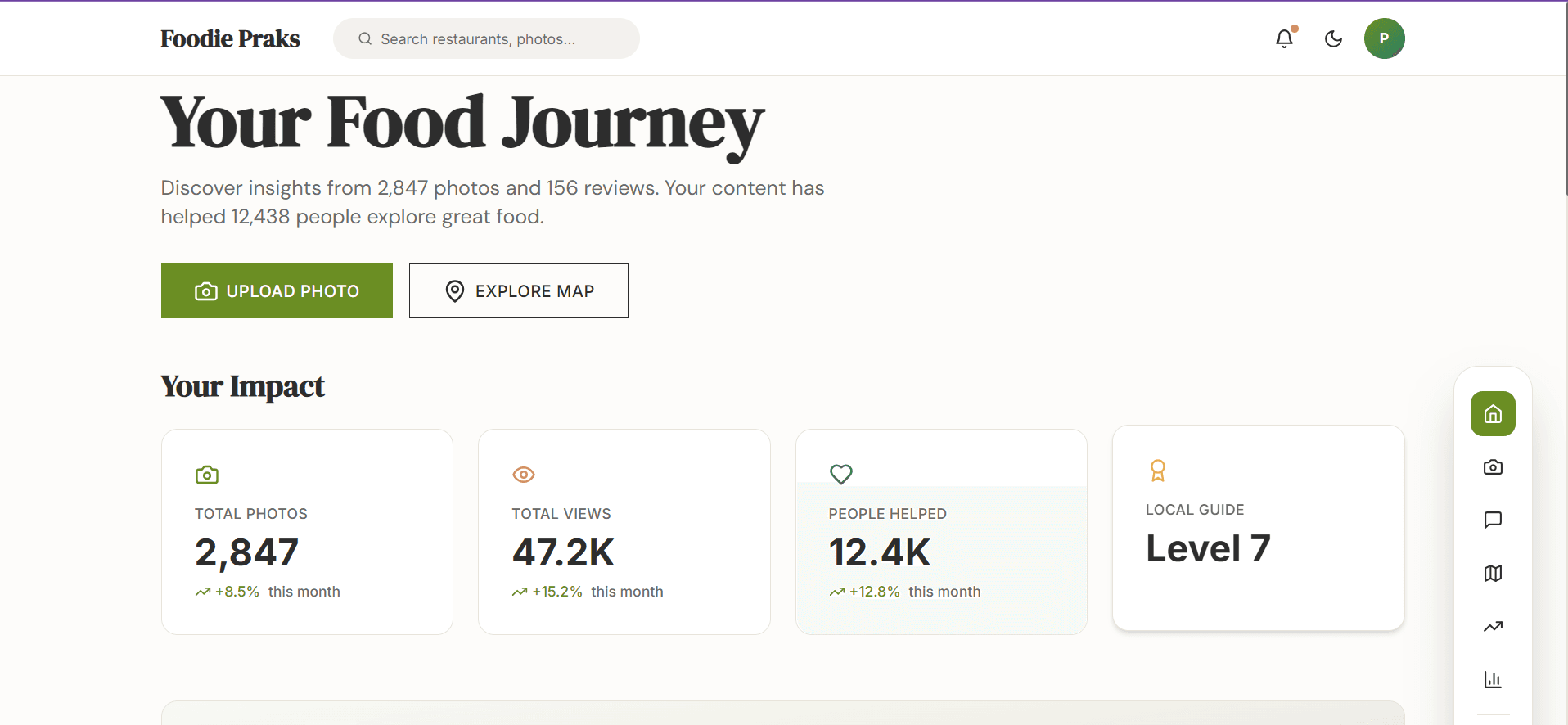
A food ordering website built with vanilla HTML, CSS, and JavaScript. No frameworks. Responsive across desktop, tablet, and mobile.

My role

Sole engineer and designer. Built the entire site as a deliberate constraint project, proving responsive layout is achievable with zero frameworks.

4 weeks · 2026

Results

  • Responsive design
  • CSS Grid & Flexbox
  • Custom animations
  • Mobile-first
Foodie Praks

Hungry people are impatient. Design for that.

A food ordering interface is one of the most UX-sensitive surfaces in consumer software. Users are hungry, making decisions based on appetite. Visual hierarchy, load time, and interaction clarity all matter more than on a utility app.

This project was a focused exercise in frontend craft: build a food ordering UI that actually feels good to use, without a framework carrying the weight.

Just me, just vanilla

Design and engineering, sole contributor. I designed the interface and built it with vanilla HTML, CSS, and JavaScript. No frameworks, no component libraries. The constraint was intentional.

Two modes: browsing vs. knowing what you want

Food ordering has two distinct modes. Exploration (I don't know what I want yet) and retrieval (I know exactly what I want). Most food apps optimize for retrieval and neglect exploration. I wanted to design for both.

Visual hierarchy leads with large food photography. Category filters are persistent and accessible. Prices and add-to-cart actions are always visible without scrolling into a detail view.

Responsive layout uses CSS Grid for the menu and Flexbox for components. The layout reflows across breakpoints without media query hacks. Each breakpoint is a natural fit for the content, not a forced adjustment.

Micro-interactions cover hover states on cards, cart badge animation on add, and smooth category filter transitions. Built with CSS transitions and minimal JavaScript, keeping the page fast.

The visual design decisions

The food card is the atomic unit of the interface, and the decisions about what lives on it matter more than they might seem.

Each card shows the food image, the item name, the price, and an add-to-cart button. That's it. No ratings, no description, no "learn more." If someone is in retrieval mode and already knows they want the butter chicken, they should be able to add it to the cart without navigating away. Every extra tap in a mobile ordering flow has a real cost. Detail pages are for exploration; the card is for action.

Color and typography were chosen to support appetite rather than work against it. Warm tones (ambers, deep reds, off-whites) are associated with food environments for good reason. They tend to activate appetite in a way that cool palettes don't. The typeface needed to hold up at small sizes because prices appear in a constrained space. A clean sans-serif with open numerals was the right call: legible at 13px, no squinting at whether that's a 3 or an 8.

For category filters, I chose pill-style horizontal scroll over a dropdown or sidebar. People scan horizontally on their phones. A horizontal strip of pills maps to that scanning pattern directly. A dropdown hides the available categories behind an interaction, which adds friction and makes the category set feel opaque. Pills are scannable, touch-friendly, and already familiar from every map app and social platform people use daily.

The empty state for filtered views was a real design decision. When you tap a category filter and nothing matches, what you show matters. A blank white space reads as a broken page. Instead, the empty state includes a short message that names what happened and a visual prompt to try another filter. Empty states are the moments when apps feel either thoughtful or broken. This one needed to feel thoughtful.

Why I didn't reach for a framework

Frameworks abstract away the fundamentals in ways that can become a crutch. Building without React forces you to think carefully about DOM management, event delegation, and state, skills that transfer directly to understanding what frameworks actually do. It also keeps the build zero-dependency and fast.

Third-party card components impose their own spacing, sizing, and breakpoint assumptions. Building the grid from scratch meant total control over food card proportions, which matters when the images are the primary UI element.

What vanilla JS forced me to think about

Without a framework managing state, the cart is a plain JavaScript object held in memory. I wrote every piece of that logic: add an item, remove an item, increment a quantity, decrement it, recalculate the total, update the badge count. Doing it manually makes something very clear: this is exactly what a state management library does, just with more ceremony. For a project of this scope, the ceremony would have been overhead. Writing it by hand took maybe two hours and left me with a much cleaner mental model of what React's useState and Redux are actually solving.

Event delegation was another explicit choice. Rather than attaching a click listener to every add-to-cart button (which would mean re-attaching listeners whenever the menu filters change) I attached one listener to the menu container and let it handle all add-to-cart clicks via event bubbling. It's more performant, simpler to maintain when cards are added or removed from the DOM, and one of those patterns that vanilla JS teaches you directly because you feel the cost of doing it wrong.

What shipped

Fully responsive across mobile, tablet, and desktop. Smooth category filtering and cart interactions with no layout shift. Zero external dependencies: pure HTML5, CSS3, and JavaScript.

What I'd do differently

The mobile checkout flow deserves a dedicated design pass. Right now it's the desktop flow reflowed to a narrower viewport, which is functional but not optimized for how people actually order food on their phones. Mobile checkout has different thumb-reach constraints, a different relationship to the keyboard, and a different context. A proper mobile-first rethink would mean reconsidering the step structure, not just the layout.

The category filtering could be more useful. Currently it filters by cuisine type. But dietary restriction filtering (vegetarian, vegan, gluten-free) is a meaningfully different need that the current system doesn't address. Someone with a dietary restriction isn't browsing by cuisine; they're filtering for safety first and preference second. Those should be composable: I want vegetarian items in the Thai category.

I'd also add a search bar. Typing "noodles" and getting live-filtered results is faster than scanning through categories when someone has a specific craving but isn't sure which category it falls under. Live filtering on a small dataset like a restaurant menu is a natural fit for vanilla JS: no API call needed, just filtering the in-memory menu array on every keystroke.

What Worked

  • CSS Grid + Flexbox handles complex responsive layouts without Tailwind or Bootstrap
  • Custom CSS animations don't slow load time; there's nothing to parse except the file itself
  • Mobile-first approach produces a genuinely usable mobile experience, not an afterthought

What Didn't

  • No component reuse without a framework means repetitive HTML; menu cards and structures are manually duplicated
  • No state management means the ordering flow resets on page refresh, a real limitation for a commerce context

Built with

HTML5CSS3JavaScriptWeb DesignFrontendResponsive